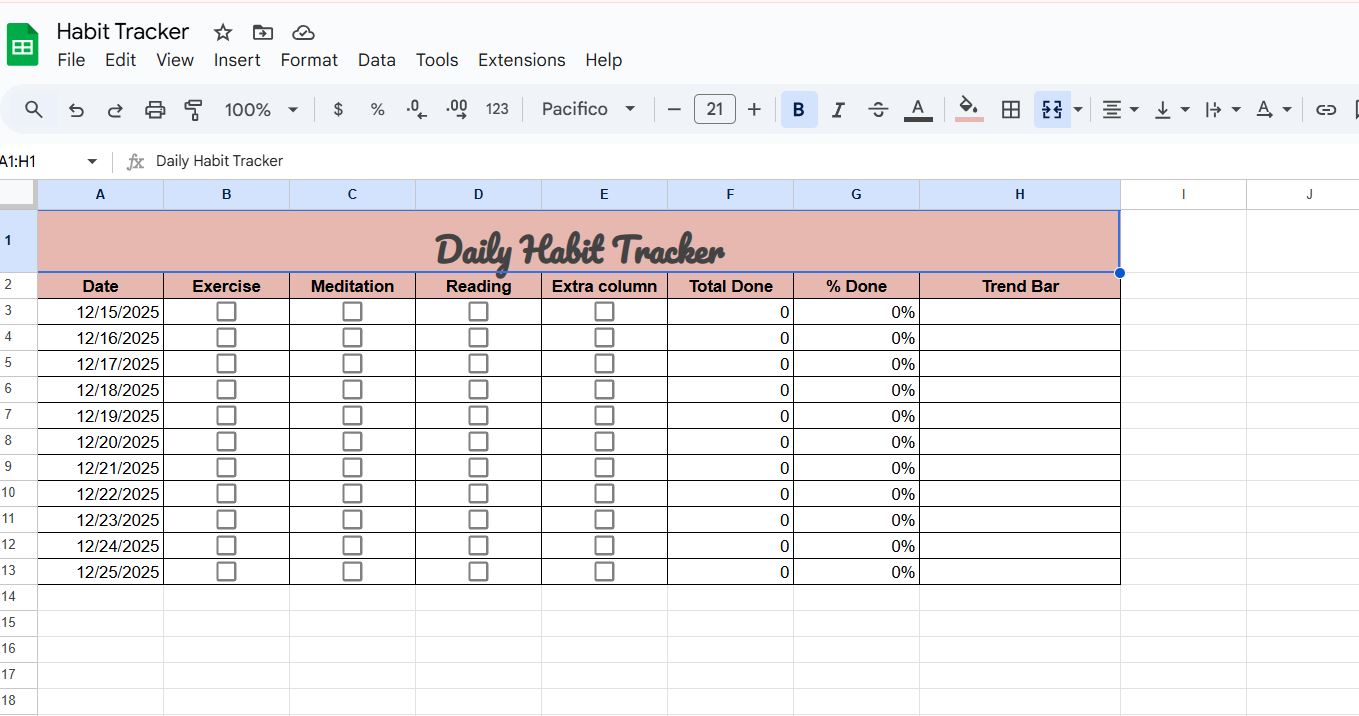
If you also want to track your habits digitally, I have brought a Daily Habit Tracker Template in Google Sheets. By using it, you can easily monitor your daily habits.
With the Habit Tracker, you can achieve your goals and stay motivated as you complete your daily habits. The tracker can be used for different purposes, such as Health & Fitness, Productivity & Work, Personal Growth & Mindset, Lifestyle & Habits, etc.
I designed this template to be beginner-friendly, so anyone can use it. I have added some random habits like Exercise, Meditation, Reading, and an extra column left blank, which the user can customize by adding his own habits.
I created this Google Sheets Habit Tracker myself as part of my learning process, and at the same time, it also helps users because it is completely free. I searched for many habit trackers online, but most of them were paid versions, which is why I decided to design my own.
I kept this habit tracker beginner-friendly so that anyone can use it easily. I personally use this tracker on a daily basis, and it has been very helpful for me. I truly believe it will be useful for others as well.
In this article, I have explained the features of this habit tracker in detail below. Please read through them and use the tracker according to your own needs. If you have any questions, feel free to ask in the comments. I will be happy to reply. Any suggestions are also always welcome.
Components of a Habit Tracker
Date Column:
You can dynamically select the date in this column. Just double-click and choose your desired date.
Exercise / Meditation / Reading:
These are the columns that represent the user’s daily life habits that they want to track. I have given these names as examples, and the user can change them according to his own needs.
Below, there are checkboxes for each day. If the user completes a habit on a particular day, they can mark it as checked. Any habit that is missed can be left unchecked.
Extra Column:
I added this column so that if a user has more habits, they can modify it and use it accordingly.
Total Done Column;
From this column, the user can see how many habits have been completed in a day. For example, if there are 4 habits and all 4 are completed, the Total Done column will show 4. If only 3 habits are completed, then 3 will be displayed.
% Done:
When all habits are completed, this column will show the percentage. If some habits are missed, the user will still get a clear idea of their overall progress.
Trend Bar:
This column is placed at the end. The trend bar visually displays the day’s progress in a graphical form, showing how much progress has been made for that day.
How to Use the Daily Habit Tracker
This Habit Tracker is very easy to use. You just need to make a copy of the Google Sheet. It is beginner-friendly, so anyone can use it easily.
The user simply needs to enter the date and then add their habits one by one. Checkboxes are provided in the columns, and the user can mark their habits as completed on a daily basis.
There is also a percentage column and a graph column, which help the user track their daily habits visually and effectively.
Benefits of Using a Daily Habit Tracker
Using a daily habit tracker comes with lots of long-term benefits. First, it helps improve self-discipline by holding you accountable. Seeing unchecked boxes over time naturally pushes you to do better.
Second, it boosts awareness. Many of us feel busy but don’t really notice how little time we spend on habits that actually matter. This tracker shows you exactly where your effort is going.
Another big plus is motivation. Even small wins, like completing just one habit a day, give you a sense of achievement. Over time, these little wins build confidence and help you stay consistent.
Finally, a habit tracker can help reduce stress by bringing structure and clarity to your daily routine.Customizing the Tracker for Personal Goals
You can customize the Habit Tracker according to your lifestyle. You can add extra columns or remove columns based on your needs.
Some users track their monthly habits, and you can copy the Habit Tracker into a new tab for each month.
The Habit Tracker is fully customizable—you can create new tabs, change names, and adjust rows according to your preferences.
Common Mistakes to Avoid While Using Habit Trackers
One common mistake is trying to track too many habits at once. It can quickly feel overwhelming and make it hard to stay consistent. It’s better to start with a few important habits and slowly add more over time.
Another mistake is expecting perfect results every single day. Building habits is a gradual process, and missing a day doesn’t mean you’ve failed. What really matters is getting back on track the next day.
Skipping updates is also pretty common. Even if you don’t complete any habits on a certain day, recording zero progress still gives you valuable data.
If you have a small or large business, I have created an Excel stock inventory template that allows you to easily monitor and manage your business stock — and it’s completely free.
Conculsion:
I have kept this Habit Tracker completely simple. This tracker is easy to use, and users can create their own copy and customize it according to their needs.
I will not give edit access to anyone; you can only view it and create your own copy. It is completely free of cost. In the future, I will also design advanced templates, which will be paid.
